Overview
The primary goal of this workshop is to provide hands-on experience in modeling, analyzing, and simulating market using the iPool Apollo platform. This part will discuss:
- Zonal Historical Analysis
- Database Update (Regional to Zonal)
- Data Visualization & Real-Time Monitoring
Objective
- To demonstrate the Zonal network modelling capability of iPool for the WESM.
- To familiarize with conversion of database from regional to zonal.
Understanding Zones
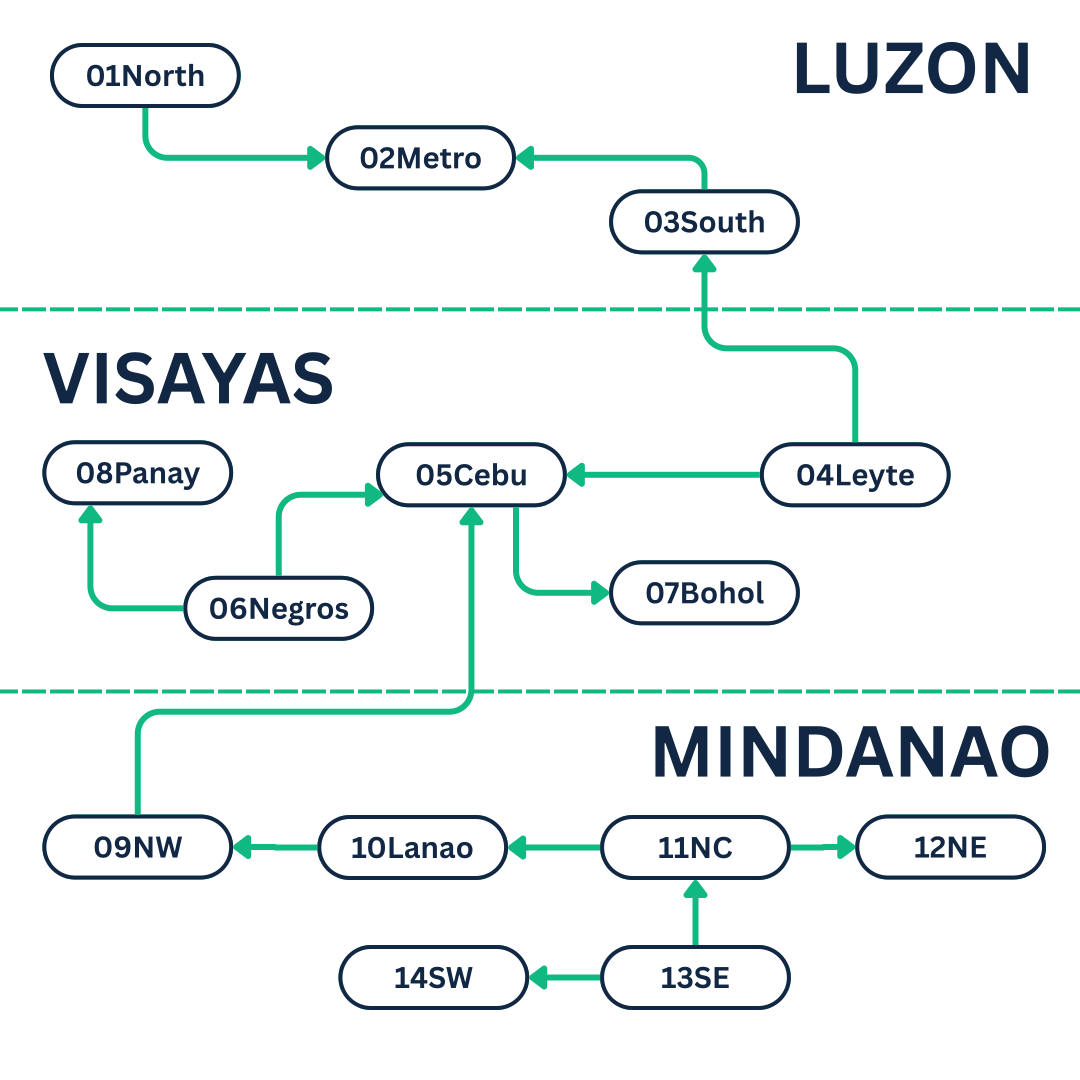
Zones represent different regions in the power system. Each zone contains:
- Demand (how much electricity is needed)
- Generation (how much electricity is produced)
- Transmission connections (how electricity flows between zones)
In the Philippines context, zones typically correspond to grid regions.
Zonal Validation and Calibration
Navigate to C:\IENERGY\WESM2603T\SERIES\ScenZon to get started.
General Execution Steps
Validate Directory Paths
Open Defaults.csv using Notepad or Excel. Verify that all directory pointers and file paths correctly map to your local machine's folder structure.
Initialize Simulation Environment
Inspect the DefInit.bat file with Notepad to confirm the system database, SysWESM2603Z.mdb. Once verified, execute the file to prepare the environment for data processing.
Zonal Model Scenarios & Files
The following table details the databases, commands, extracted files, and scenarios used for Zonal Validation and Calibration.
| Item / Scenario ID | Description |
|---|---|
| SysWESM2603Z | System database containing 14 interconnected iPool regions and 3 pricing zones (reverse terminology from WESM). • Zero the Reserve Requirements for all regions except for 02METRO. • Set 02METRO reserve requirement to 600 MW. |
| ZHST | Zonal historical scenario generated from IEMOP WESM historical real-time data using SysWESM2603Z.mdb (updated via mnm_genlist.csv). Generates HistDBErr.csv and an Event file (out-of-merit outages and temporary link deratings). NOTE: For the zonal model, inter-island link deratings must be deleted from the generated Ev_ZHST.csv file. |
| -setzones | iPool command to convert the current system database used by the WESM scenario from 3 regions to 14 regions and 3 zones. |
| Ev_ZHST.csv Ev_ZHST1.csv Ev_ZHST2.csv | Event files containing historical out-of-merit generation and calibrated deratings of VISLUZ and MINVIS links (all other link events are deleted). • Ev_ZHST.csv: Extracted events without inter-island deratings. • Ev_ZHST1.csv: Extracted events without calibrated MINVIS derating. |
| Dem_ZHST.csv DemHr_ZHST.csv | 5-minute and hourly demand files extracted from the historical scenario. |
| Gen_ZHST.csv GenHr_ZHST.csv | 5-minute and hourly generation capacity factor files of the Must-Run sites extracted from the historical scenario. |
| OM_ZHST.bid | Bids for Out-of-Merit generation sites extracted from the historical scenario. |
| ZBCA ZBCA1 ZBCA2 | 5-minute simulated backcast zonal scenarios using calibrated event files, out-of-merit bids, and reserve parameters (-pcsr 2). • ZBCA1: Uses Ev_ZHST1.csv • ZBCA2: Uses Ev_ZHST2.csv |
| ZBCA2e1 ZBCA2e2 | Variations of ZBCA2 testing link limits: • ZBCA2e1: ZBCA2 with link event CEB-LEY limit at 550. • ZBCA2e2: ZBCA2 with link event CEB-LEY limit at 500. |
| ZBCAH | Hourly simulated backcast zonal scenario. |
| ZCBH ZCBHAP5 ZCBHAPX | Hourly Cost-Based scenarios: • ZCBH: Base hourly cost-based scenario. • ZCBHAP5: Uses Administered Prices APrices5.csv (flat 5000). • ZCBHAPX: Uses Administered Prices APricesX.csv (profiled 7 x 24-hour prices). |
Batch Files Used
This section will discuss the batch files used in ScenZON series.
I. Initialize Database
The DefInit.bat initialize the database which is required before running any simulation. This ensures that proper databases are referenced and used.
Read more about database here.
If needed, change SysWESM2603Z.mdb to match the latest database version required for your series.
II. Historical Load and Backcasting
The RunZON.bat script contains the command lines required to convert SysWESM2603.mdb from a regional database into a zonal database (SysWESM2603Z.mdb). It also automatically executes the historical load generation and backcast calibration sequences.
A single batch file can sequentially execute multiple scenarios and command instructions.
III. What-If Scenarios
These what-if scenarios simulate the derating of the CEB-LEY transmission link down to 550 MW and 500 MW. It is done by creating the event file in CSV. Navigate to C:\IENERGY\WESM2603\SERIES\ScenZON\Events and check out Ev_LINK1.csv and Ev_LINK2.csv.
IV. Administered Pricing Scenarios
This batch file models the market under administered pricing conditions. To review the specific price inputs utilized by this script, navigate to C:\IENERGY\WESM2603\SERIES\ScenZON\Prices and inspect ZAPrices5.csv and ZAPricesX.csv.