Inputs for BESS
This section will cover the key inputs in modeling the Battery Energy Storage Systems (BESS) to be added later on in the database.
1. The "Twin Unit" Concept
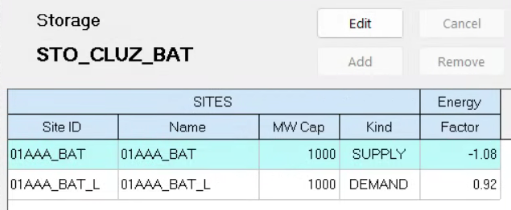
Modeling a battery in iPool requires defining it as both a supply and a demand unit to accurately account for its ability to charge and discharge within the market. Hence, iPool treats the battery as two distinct "twin" units that link back to the same storage system. This is configured in the Sites.csv file by linking two units to the same Storage ID and setting their Storage Factor to either a positive value (for the demand/load unit) or a negative value (for the supply unit), as shown in the figure above.
- Supply Unit: Generates power into the grid; operating this unit reduces the overall storage level. Naming convention: UnitName example: 01AAA_BAT_G01
- Demand Unit: Consumes power from the grid to charge; operating this unit increases the overall storage level. Naming convention: UnitName_L example: 01AAA_BAT_G01_L
2. CSV Files Connection
The three files define storage assets at different modeling layers:
Storages.csv– Defines the energy reservoir (MWh limits and initial state of charge).Sites.csv– Links to the storage viaStorIDand defines efficiency, costs, and outage parameters.Units.csv– Links to the site viaSiteIDand defines dispatch and operational constraints (MW limits, ramp rates, reserves, fast start).
3. Key CSV Files
To successfully add a BESS to the iPool database, three primary CSV files must be configured to establish the physical parameters, the site links, and the energy limitations. These files are located in C:\IENERGY\WESMXXX\Databases, where WESMXXXX is the current working folder.
These files should be saved in the Databases folder.
See each tab to learn more about the primary CSV files.
- Storages
- Sites
- Units
Storages.csv
The Storages.csv file defines the physical limits of the energy reservoir. It sets the maximum and minimum energy capacity (MWh) and the PcBeg (Beginning %), which determines the initial state of charge at the start of the simulation.
For Battery Energy Storage Systems (BESS), PcBeg is typically set to 50% to provide balanced charging and discharging flexibility.
The table below describes the parameters for storage assets (e.g., STO_CLUZ) as defined in the Storages.csv data structure.
| Item | Description | Example Value |
|---|---|---|
| StorageID | Unique identifier of the storage. | STO_CLUZ (user-defined) |
| Region | Region associated with the storage. | CLUZ, CVIS, or CMIN |
| StorageType | Classification of the storage. | BAT, HYDRO, GAS |
| InFlow | Rate of inflow into the storage (for hydro or similar technologies). | 0 (for BESS) |
| Max Cap (MWh) | Maximum energy capacity of the storage (MWh). | 4000 (user-defined) |
| Min Cap (MWh) | Minimum allowable energy level (MWh). | 1 (user-defined) |
| Begin Level (%) | Initial state of charge at the start of the simulation. | 50 (user-defined) |
| MoF0 – MoF12 | Monthly inflow values (if applicable). | 0 (for BESS) |
| Upstream StorageID | Upstream storage ID (if applicable). | (No input required for BESS) |
| Upstream Factor | Upstream factor. | 1 |
| Inflow Time Hrs | Inflow time (hours). | 0 (for BESS) |