Overview
This section explains how to create typical bids using Bid Manager. Typical bids are aggregated bid profiles generated from historical bid data and are used to represent common or recurring bidding behavior.
Typical bids can be generated through the Graphical User Interface (GUI) or through a batch script for automated processing. This method is useful for studies that require representative bid patterns rather than exact historical bids, such as forecasting, planning, or scenario simulations.
- Required Inputs
- Step-by-step procedure
- Exercise
Typical Bids
Typical bids are aggregated bid profiles based on historical bid data. They are used when a study requires representative bid patterns — such as forecasting, planning, or scenario simulations — rather than exact historical bids.
Prerequisites
- Historical bid files (
.bidx) already generated and validated for the target period - Working directory configured with
DefInit.bat
Step-by-Step Guide
Follow the phases below to configure, generate, validate, and collate aggregated typical bids.
- Phase 1: Generation
- Phase 2: Validation
- Phase 3: Collation
Generate Typical Bids Using Bid Manager
Launch the Aggregator by opening iEnergySuite.exe.
The application is usually located in: C:\Program Files\iEnergySuite
Once the application is open, configure the following:
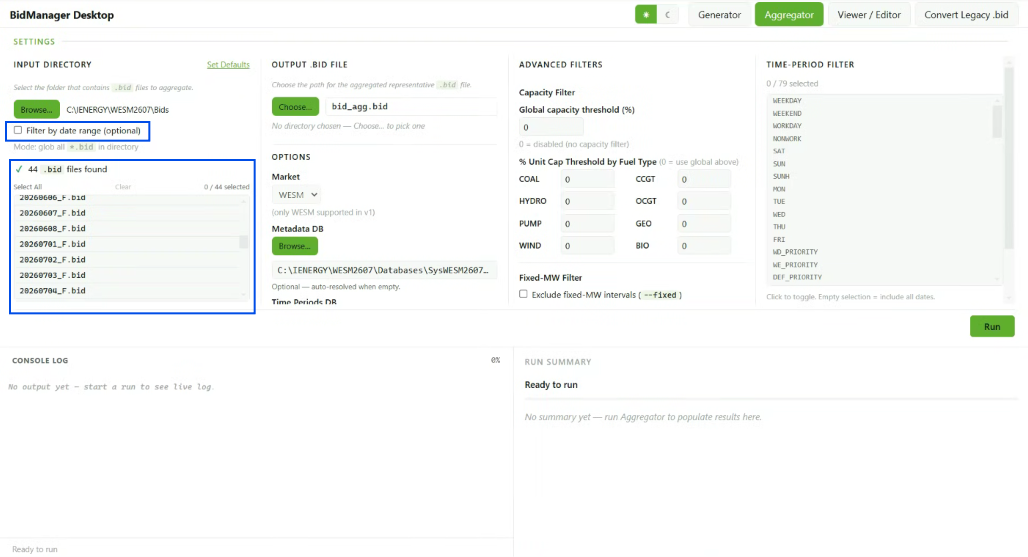
1. Select the Historical Bid Data
Choose the historical bids that will be used as the source data for aggregation. These historical bids should already be available and properly generated before creating typical bids.
2. Apply Advanced Filters
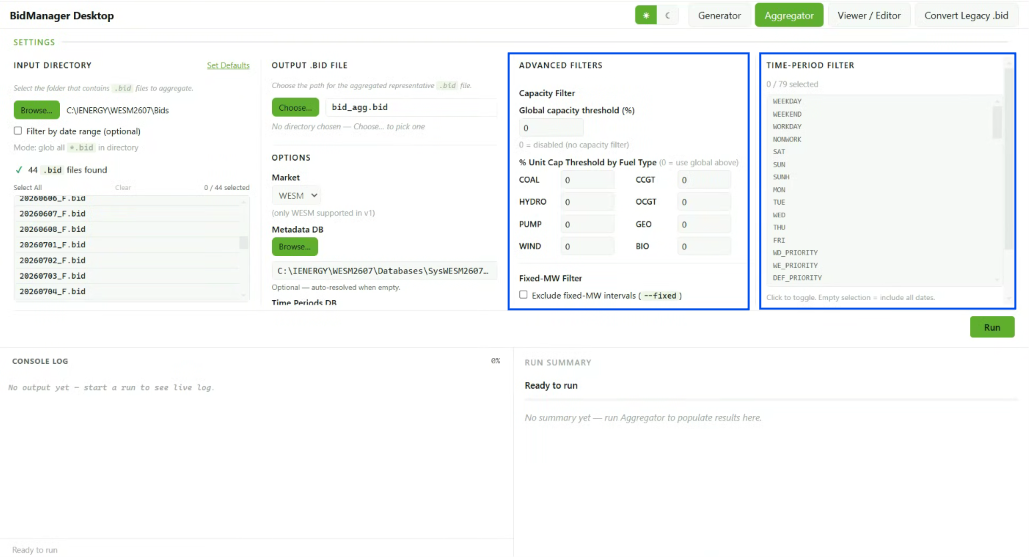
Update the filters to refine the data that will be included in the aggregation. Configure the following filters as needed:
- Day Type — Select the calendar day type to aggregate:
WORKDAY,SAT, orSUN - Unit Capacity Thresholds by Fuel Type — Set the minimum available capacity threshold for selected unit or fuel types
3. Enter the Output Filename
Enter the desired filename for the typical bid file. Recommended filenames:
WD.bidx— workday typical bidsSAT.bidx— Saturday typical bidsSUN.bidx— Sunday typical bids
4. Execute the Aggregation
Click Run to generate the typical bid file. The generated .bidx file will be
saved in the configured output directory.
Alternative: Generate Typical Bids Using a Batch File
Create a new batch file named RunBidAgg.bat and save it in your working directory.
To generate reliable aggregated bids, use a minimum look-back window of 7 days.
Make sure the Number of Days field, or the -ndays parameter in the batch script,
is set to 7 or more.
Use the latest available historical data relative to the start of the simulation.
Change the date in the -t parameter according to the desired start date of the
bids to aggregate. For example:
-t "20251124"
This date should be updated depending on the historical period that will be used as the source for the typical bids.
Sample Batch File
call DefInit.bat
set "PATH=C:\Program Files\iEnergySuite\resources\engine"

REM ==================================================
REM -cap_COAL 70 means for all COAL stations, aggregate only if the available capacity is greater than or equal to 70%.
REM -cap_CCGT 40 means for all CCGT stations, aggregate only if the available capacity is greater than or equal to 40%.
REM -cap 0 means for all other stations, aggregate the available capacity including when it is 0%.
REM -bt WORKDAY means apply only for dates that are WORKDAY calendar day type, Monday to Friday except holidays.
REM Note: If -cap_COAL 70 for WD.bidx does not produce good results, try -cap_COAL 40 and compare the simulation results.
REM Input Folder is DirBid and Output Folder is DirSub in Defaults.csv.
REM -s Filename.bidx saves the typical bid to the Bids folder.
REM ==================================================

bidmanager-aggregator.exe -t "20251124" -ndays 7 -cap 0 -cap_COAL 10 -cap_CCGT 10 -bt SUN     -s SUN.bidx  -log
bidmanager-aggregator.exe -t "20251124" -ndays 7 -cap 0 -cap_COAL 20 -cap_CCGT 10 -bt SAT     -s SAT.bidx  -log
bidmanager-aggregator.exe -t "20251124" -ndays 7 -cap 0 -cap_COAL 50 -cap_CCGT 40 -bt WORKDAY -s WD.bidx   -log
Batch File Parameter Guide
| Parameter | Description |
|---|---|
-t | Defines the start date of the historical bids to aggregate. |
-ndays | Defines the number of days included in the aggregation. Use at least 7. |
-cap | Sets the default available capacity threshold for all other stations. |
-cap_COAL | Sets the available capacity threshold for coal stations. |
-cap_CCGT | Sets the available capacity threshold for CCGT stations. |
-bt | Defines the day type to aggregate: WORKDAY, SAT, or SUN. |
-s | Defines the output .bidx filename. |
-log | Generates a log file for checking the aggregation process. |
Replace WESMXXXX with the correct project or study folder.
Before generating typical bids, make sure that the historical bids have already been created and validated.
Exercise
Give it a try and do this exercise:
Step 1 of 3
Launch Suite and open the Aggregator tab