Overview
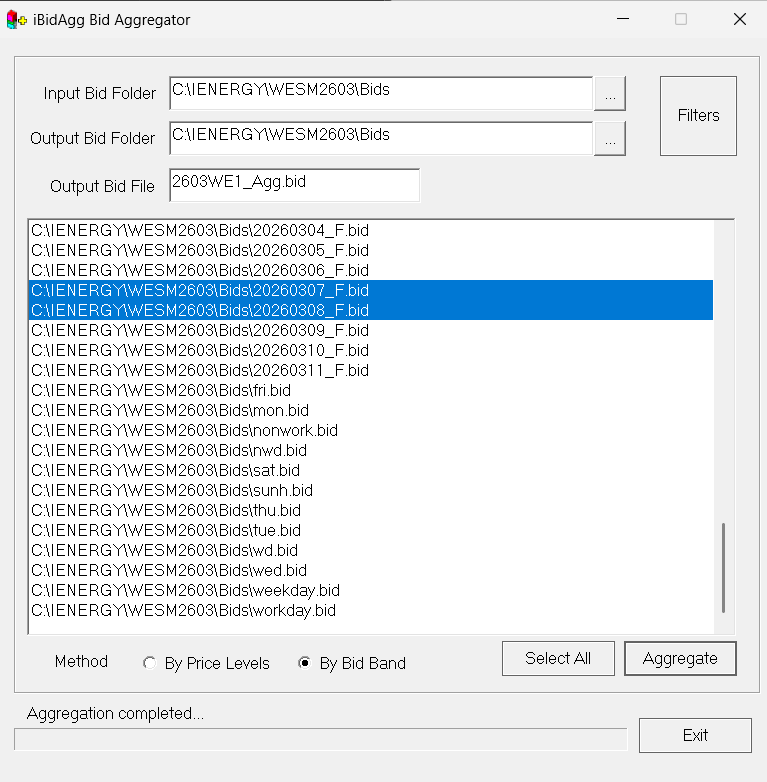
This section contains the steps on how to create typical bids (aggregated bids) using iBidAgg.exe.
Step-by-step Procedure
Follow the phases below to configure and generate your aggregated typical bids.
- Phase 1: Configuration
- Phase 2: Validation
1
Configure iBidAgg
Launch the application and set up your aggregation filters and methods.
- Launch the Application: Open
iBidAgg.exelocated atC:\Program Files (x86)\iEnergy\. - Select Data: Choose the historical bids you want to aggregate from the interface.
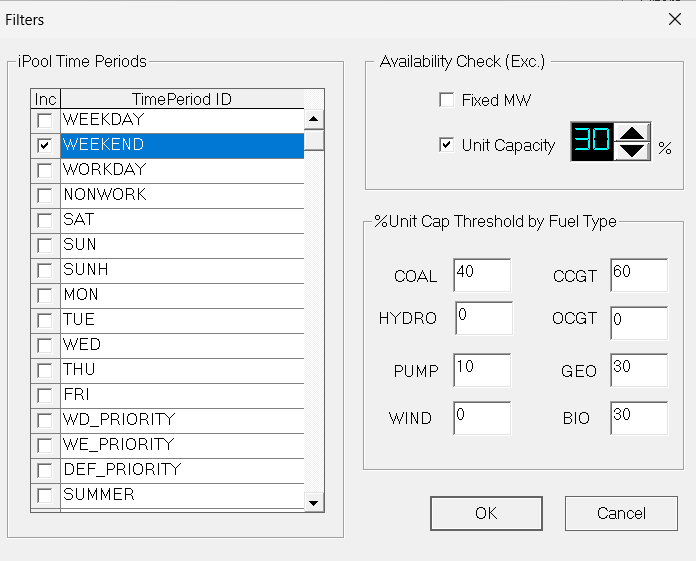
- Apply Filters: Click the Filters button to refine your data.
- Configure the day type for aggregation (e.g., Workday, Saturday, Sunday, etc.).
- Edit the Unit Capacity Thresholds accordingly.
- Click OK.
- Set Output Name: Enter the desired filename for your new typical bids.
- Execute: Select your desired Method and click Aggregate.