Historical Bids
Overview
Historical bids let iPool reflect the actual supply and demand offers submitted during a selected period of WESM market history. For the tool reference and step-by-step procedure, see the Generator page in the Bid Manager reference tab.
What It Is
Historical bids are reconstructed from actual past WESM market data — specifically the
RTDOE energy bids and RTDOR reserve bids for a selected period. The Generator sub-tab
processes those raw CSV files and produces a .bidx file readable by the Bid Manager
Viewer / Editor, eliminating the need to manually handle hundreds of individual RTDOE and
RTDOR files.
When to Use
Use Historical Bids before running a historical or backcasting simulation — generate
the .bidx file for the target period from your RTDOE and RTDOR downloads so iPool
can reproduce the market conditions of that period.
Step-by-Step Guide
- 1. Set up the WESM folder
- 2. Configure the date range
- 3. Set the output directory
- 4. Run
Set WESM Files Directory to the folder containing your RTDOE and RTDOR downloads.
The folder must have RTDOE/ and RTDOR/ subdirectories. A validation indicator shows
whether the folder is valid.
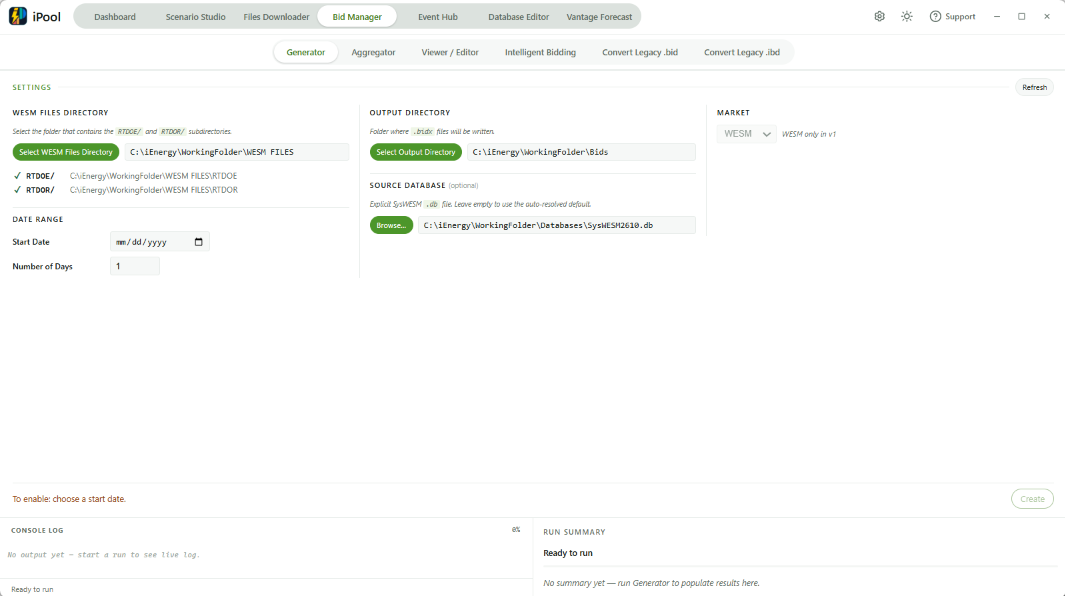
- Set Start Date and N Days (minimum 1; defaults to 1).
- The generator processes N Days consecutive days in a single run (any whole number ≥ 1 is accepted).
- Set Output Directory — the folder where
.bidxfiles will be written (one per day in the range). - Optionally, specify a Source Database (a SysWESM
.dbfile) for reference table resolution; leave empty to use the auto-resolved default.
- The market selector shows WESM — the only supported market in this version.
- Click Create.
- Status messages: Ready to run → Running — day N of M… → All N day(s) completed successfully (or partial/error variants).
- Days with incomplete RTDOE data are skipped (not failed); they appear in the log.