Understanding Defaults.csv
Defaults.csv is the central configuration file that tells iPool Dashboard where to find its resources and how to behave during simulations. Understanding its structure — especially the directory paths — is essential for every simulation you run.
- Required file:
Defaults.csvlocated in your working directory - What this page covers: the three sections of Defaults.csv (Market Parameters, Directory Configuration, Calibration Parameters) and how each affects simulation behavior
- Exercise: open Defaults.csv and verify that the directory paths point to your current working folder
Understanding Defaults.csv
Defaults.csv is the central configuration file that tells iPool Dashboard where to find its resources and how the software should behave during simulations. Instead of hardcoding these settings, iPool Dashboard reads them each time it starts. This design allows the software to adapt to different project environments without modifying the application itself.
iPool Dashboard reads Defaults.csv automatically on startup. Any changes to the file take effect the next time the application is launched.
What Does Defaults.csv Control?
Defaults.csv is organized into three main sections. Use the tabs below to review each section.
- A. Market Parameters
- B. Directory Configuration
- C. Calibration Parameters
Market Parameters
The Market Parameters section defines core simulation behavior. Examples include:
- POOLID — Market Pool ID (e.g.,
WESMfor the Philippine Wholesale Electricity Spot Market) - VOLL — Value of Lost Load (e.g.,
32,000₱/MWh) - VOLG — Value of Lost Generation (e.g.,
-40₱/MWh) - HR0 — Dispatch starting hour
- MarketDat — Market data source (e.g.,
FILEfor file-based market data) - DatabaseT — Database type (e.g.,
MSAccess) - bSMP — Enables System Marginal Pricing when set to
1 - 5mnDisp — Dispatch resolution (
1= 5-minute,0= hourly WESM / half-hour AEMO) - ExcPS — Excludes pump storage and demand units from regional demand when enabled
- iDyNoMaint — Start day of year to restrict maintenance scheduling (default
100) - jDyNoMaint — End day of year to restrict maintenance scheduling (default
300)
These values influence how the simulation engine models the electricity market.
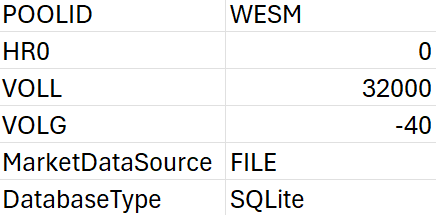
Normally, the calibration values in Defaults.csv do not need to be changed, as they are primarily used for simulations. However, always verify that the file directory is correct before proceeding.
Directory Configuration
This is the most frequently reviewed section. It specifies where iPool Dashboard searches for all input and output files:
- Databases — path to system, bid, flow, and scenario database files
- Scenarios — path where simulation scenario files are saved
- Demand files — path to historical and forecasted demand data
- Generation files — path to historical and forecasted generation data
- Event files — path to event configuration files
- Bid files — path to Historical, Typical, Custom, and Dynamic bid files
- Price files — path to market price data
- Contracts — path to contract data files
- Weather files — path to weather input data
- Tariffs — path to tariff data
- Reports — path where simulation reports are saved
- Historical market data (WESM Files) — path to downloaded RTDOE, RTDOR, RTD, and related WESM files
If any directory points to an incorrect location, iPool Dashboard may fail to locate required inputs or save outputs correctly.
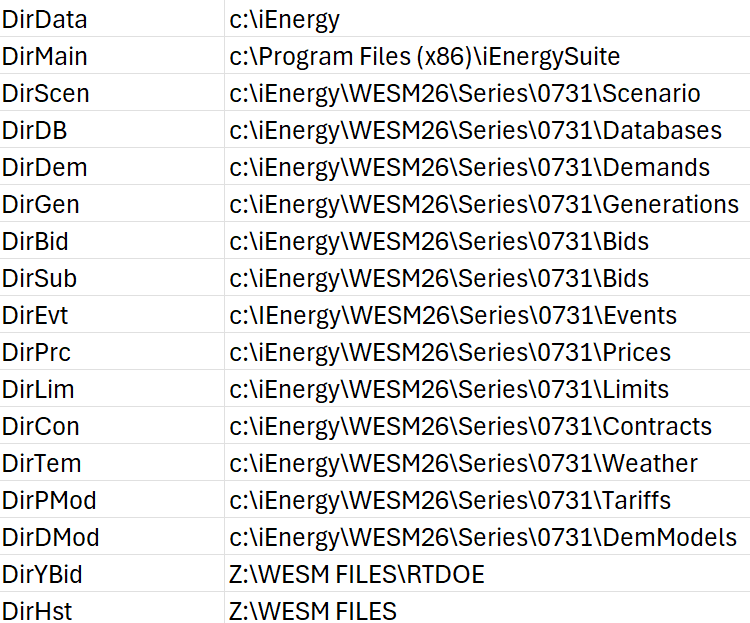
Whenever working folders are moved or copied to another computer, verify that the directory paths in Defaults.csv remain valid. Incorrect paths are one of the most common causes of missing files during simulation.
Calibration Parameters
Several calibration factors are stored in Defaults.csv, including reserve pricing and demand response adjustments. These values influence advanced simulations and model calibration.
- xFr — Reserve pricing calibration factor (default
0.93) - xRu — Upward reserve calibration factor (default
0.35) - xRd — Downward reserve calibration factor (default
0.34) - xDr — Demand response calibration factor (default
0.8) - PoEH — Percent of Exceedance (High) elbow point, used in solar/wind conversion (default
0.3) - PoEL — Percent of Exceedance (Low) elbow point, used in solar/wind conversion (default
0.6) - dHot — Hot weather classification threshold (default
35°C) - dWarm — Warm weather classification threshold (default
30°C) - dCool — Cool weather classification threshold (default
25°C) - dCold — Cold weather classification threshold (default
15°C)
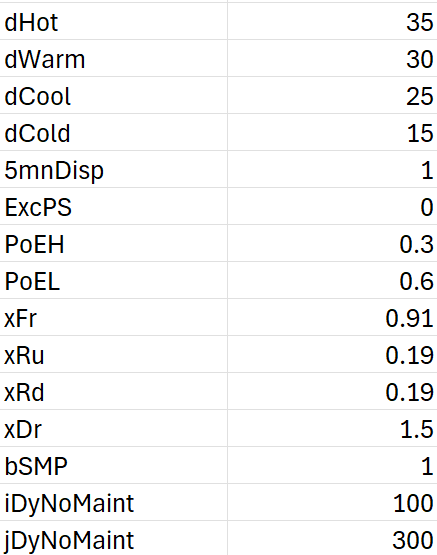
Calibration parameters should generally only be modified by experienced users or under guidance from iEnergy support. Incorrect calibration values can produce inaccurate simulation results across all scenario types.
Exercise
Give it a try and do this exercise:
Step 1 of 3
Open Defaults.csv