Overview
This section outlines the basic workflow for market analysis:
- Downloading market data
- Configuring the
DefInit.bat - Setting up the
Defaults.csv
Every simulation in iPool Apollo follows the same high-level workflow. The sequence — Prepare Input Data → Verify Configuration → Initialize the Environment → Create a Scenario → Execute the Simulation → Review Outputs — applies whether you are running a Historical Load, Backcast, Forecast, or What-If scenario. The prep steps below cover the first three; the tabs then extend into scenario creation, execution, and output review.
Quick Guide
- Step 1: Prepare Inputs
- Step 2: Initialize
- Step 3: Configure File Path
- Step 4: Simulation Overview
- Step 5: Create a Scenario
- Step 6: Execute the Simulation
- Step 7: Review Outputs
Typical inputs include:
- Demand files — historical or forecasted regional demand profiles
- Generation files — historical or forecasted capacity factor data
- Bids — Historical, Typical, Custom, or Dynamic bid files in
.bidxformat - Event files — constraints or scenario variations applied to the simulation
- Market data:
- RTD — Unit Generation and Load Demand, Price (LMP and SMP), and MLF
- RTDOR — Reserve Bid Offers (Dr, Ru, Rd)
- RTDOE — Energy Bid Offers
- RTDHS — Link Flows
- RTDRS — Reserve Schedules
- MP — Marginal Unit
- RTDOPRSVSUMM — Reserve Prices
Downloading Market Data
The market data consists of real-time, week-ahead, and day-ahead data. These are downloaded from the IEMOP website and should be saved in their respective folders under C:\IENERGY\WESMXXXX\WESM FILES.
Suite includes a downloader for not just RTD files but also Week Ahead Projection (WAP) and Day Ahead Projection (DAP). Simply choose which files you need, then set the start and end date to download market data.
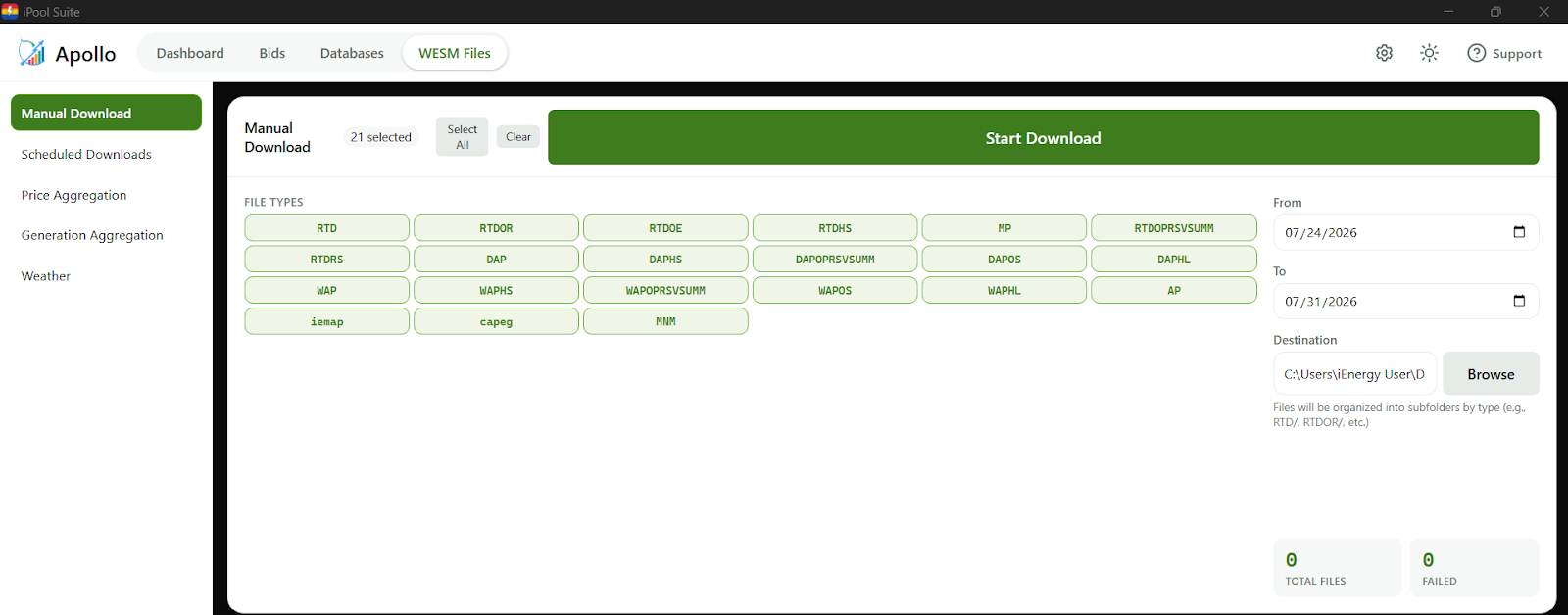
The historical load will not run successfully if the data is incomplete. To prevent this, the -checkinputs command ensures that all required data is complete before running the historical load.
There is a 7-day delay before RTDOE and RTDOR files are uploaded to the IEMOP website. When planning a Historical Load run, ensure your selected date range accounts for this delay.
Market Data Information
- Real-Time Data
- Week-Ahead Projection
- Day-Ahead Projection
| File Name | Description | Directory Location |
|---|---|---|
| RTD | Unit Generation & Load Demand, Price (LMP & SMP) & MLF | C:\IENERGY\WESMXXXX\WESM FILES\RTD |
| RTDOR | Reserve Bid Offers (Dr, Ru, Rd, Dr) | C:\IENERGY\WESMXXXX\WESM FILES\RTDOR |
| RTDOE | Energy Bid Offers | C:\IENERGY\WESMXXXX\WESM FILES\RTDOE |
| RTDHS | Link Flows | C:\IENERGY\WESMXXXX\WESM FILES\RTDHS |
| RTDRS | Reserve Schedules | C:\IENERGY\WESMXXXX\WESM FILES\RTDRS |
| MP | Marginal Unit | C:\IENERGY\WESMXXXX\WESM FILES\MP |
| RTDOPRSVSUMM | Reserve Prices | C:\IENERGY\WESMXXXX\WESM FILES\RTDOPRSVSUMM |
| File Name | Description | Directory Location |
|---|---|---|
| WAP | Week-ahead Projection | C:\IENERGY\WESMXXXX\WESM FILES\WAP |
| WAPHS | Link Flows | C:\IENERGY\WESMXXXX\WESM FILES\WAPHS |
| WAPOPRSVSUMM | Reserve Prices | C:\IENERGY\WESMXXXX\WESM FILES\WAPOPRSVSUMM |
| WAPOS | Week-ahead Projection Outage Schedule | C:\IENERGY\WESMXXXX\WESM FILES\WAPOS |
| WAPHL | HVDC Limits Imposed | C:\IENERGY\WESMXXXX\WESM FILES\WAPHL |
| File Name | Description | Directory Location |
|---|---|---|
| DAP | Day-ahead Projection | C:\IENERGY\WESMXXXX\WESM FILES\DAP |
| DAPHS | Link Flows | C:\IENERGY\WESMXXXX\WESM FILES\DAPHS |
| DAPOPRSVSUMM | Reserve Prices | C:\IENERGY\WESMXXXX\WESM FILES\DAPOPRSVSUMM |
| DAPOS | Day-ahead Projection Outage Schedule | C:\IENERGY\WESMXXXX\WESM FILES\DAPOS |
| DAPHL | HVDC Limits Imposed | C:\IENERGY\WESMXXXX\WESM FILES\DAPHL |
Exercise
Give it a try and do this exercise:
Step 1 of 3
Review your available input files